
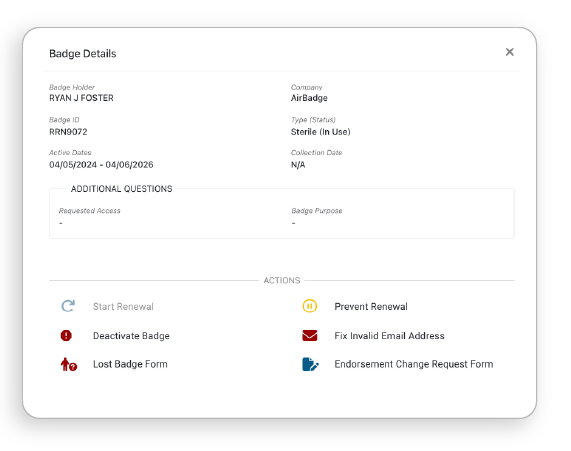
Badge actions help signatories manage badge records under their authorization. These actions allow you to take steps such as starting renewals, preventing renewals, or deactivating badges. Not all actions are available at all times. Availability depends on the badge’s status and your airport’s configuration.

Start Renewal
Available to signatories within 30 days of a badge’s expiration. Use this action to initiate the renewal process for the badge.

Prevent Renewal
Available on any active badge under a signatory’s authorization. Prevents automations and stops the badge holder from renewing. The badge holder is not notified.

Endorsement Change
May be available depending on airport configuration. Enables a signatory to request a change to a badge. All requests must be approved by the badge office.

Deactivate Badge
Allows you to deactivate any badge under your authorization. Both the badge holder and the badge office are notified immediately.

Fix Invalid Email
Available if the individual does not have an active email in AirBadge. Signatories cannot edit existing emails already in the system.

Lost Badge Form
May be available to signatories. Enables you to provide a written account of a lost badge for review by the badge office.